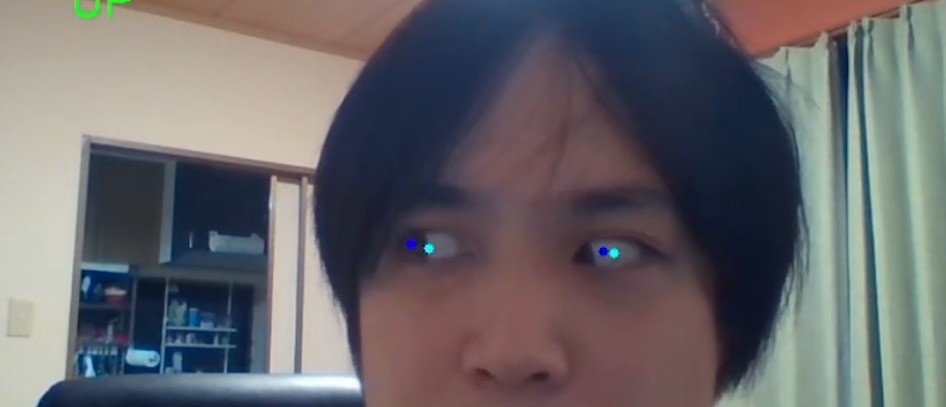
Eye Tracking
OpenCV Eye Tracking — a gaze-analysis prototype for psychology research that detects pupil position from a webcam feed and estimates which way the eyes are looking, in real time.
OpenCV
dlib
Python
Computer vision
Solo project
Platform
A regular webcam — no dedicated eye tracker hardware
Detection
dlib’s 68-point facial landmark model, no extra training or calibration
My role
Solo project: planning and implementation, start to finish
Released
Published on GitHub (gakutosasabe/OpenCVEyeTracking): 5 stars, 1 fork
Background and technical challenge
Gaze analysis — where someone is looking — is valuable data for psychology research, but dedicated eye trackers are expensive and hard to justify. As a way to practise OpenCV and Python, I set out on a personal project to see whether a plain webcam alone could give a simple estimate of gaze direction.
Starting from the eye regions found by the facial-recognition library dlib, I located the pupil with no extra training or calibration, then compared it against the eye’s centre to convert it into a gaze direction — up, down, left or right.
Approach. No extra hardware, no training data — just a webcam, dlib’s landmarks, and simple image thresholding.
Role and scope
A personal project, on GitHub as gakutosasabe/OpenCVEyeTracking. I handled everything myself, from planning to implementation.
Technology and architecture
Face and eye detection
dlib, using its pre-trained shape_predictor_68_face_landmarks.dat model, gives 68 facial landmarks, from which both eyes’ coordinates are read.
Pupil detection
The cropped eye image is thresholded to black and white; the centroid of the dark pixels (the pupil) becomes its coordinate.
Visualisation
OpenCV overlays the result on the camera feed — a blue dot for the pupil, a light-blue dot for the eye’s centre, and the pupil’s coordinate relative to that centre shown at the bottom of the screen.
Estimating gaze direction:
Split the eye region into three columns to define Left / Straight / Right, and three rows to define Up / Middle / Down.
Check which cell the pupil’s coordinate falls into, and output each eye’s own gaze direction.
What took some care
The pupil detector is deliberately simple: threshold the eye image and take the centroid of the dark region. Even without any extra training, this held up reasonably well.
But the threshold is very sensitive to ambient brightness — a real constraint, since it needs re-tuning whenever the environment changes.
After building it, I learned that detecting the pupil as a circle via a Hough transform is the more common approach — a known way to improve accuracy that I haven’t implemented yet.
Results and impact
Working prototype
Pupil detection and gaze estimation (up/down/left/right) from a webcam feed alone, no extra hardware required.
Public reception
Released on GitHub: 5 stars and 1 fork.
Skill gained
Came away confident this could genuinely help psychology research, and picked up OpenCV skills carried into later work.
Learnings and next steps
A threshold-based pupil detector is simple to build, but I felt its clear limit: dependence on lighting conditions.
For more robust detection, comparing this against Hough-transform circle detection, or a trained-model approach such as Mediapipe, is the next step.
View on GitHub