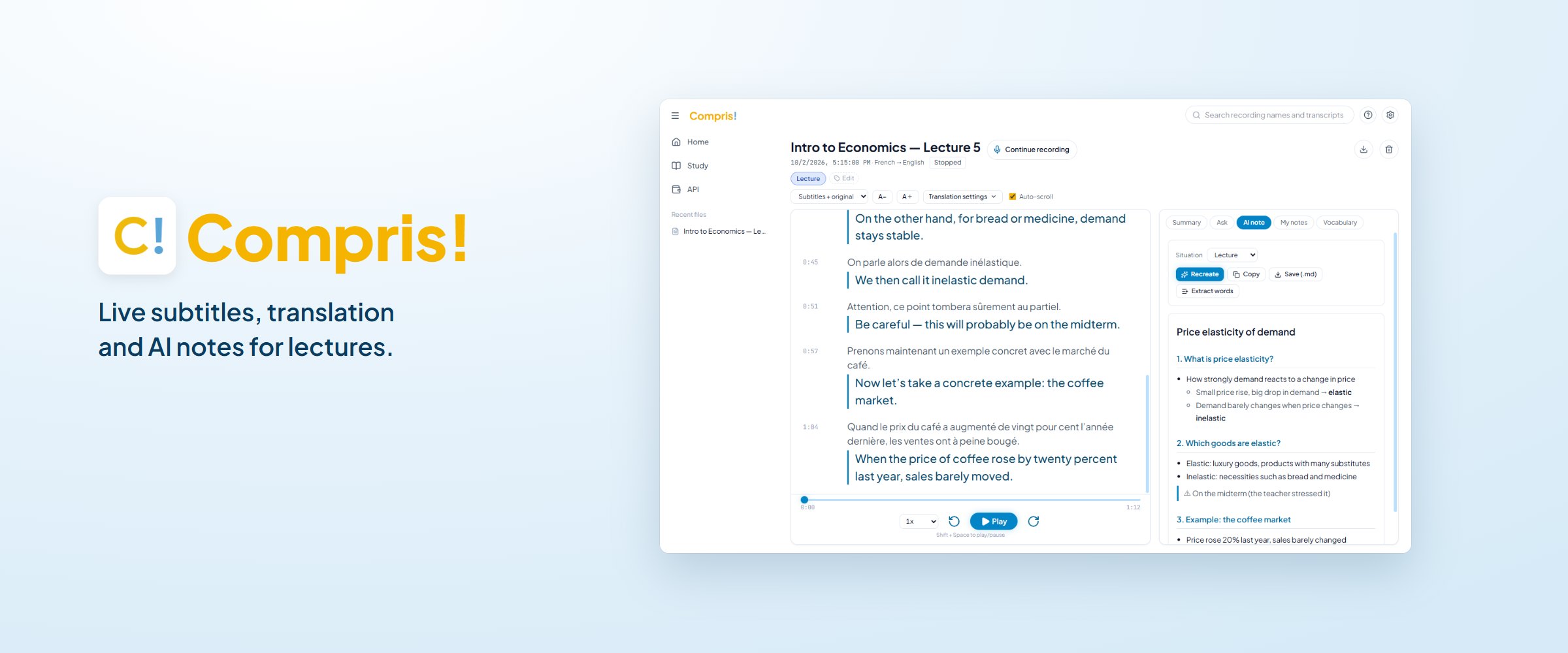
Compris!
A Windows app that turns foreign-language lectures and meetings from “huh?” into “got it!” — live subtitles and translation, an AI to ask during class, and notes, vocabulary and quizzes afterwards.
UI design
Electron
React / TypeScript
Node.js
AI APIs
Product launch
Role
Solo: planning, UI design, development, landing page and sales
Timeline
Three weeks from idea to launch (now being tested with early adopters)
Format
Windows app (one-time purchase), running on the user’s own AI API keys
Website
Background, problem, hypothesis
Studying in France, I couldn’t keep up with the speed of lectures in French. In the middle of a class I thought: “What if I could see subtitles and a translation while listening?” — and started building.
Existing services had three problems. They are expensive: transcription runs on ¥20–30k-a-year subscriptions, with live translation only on higher plans. The data isn’t yours: recordings live in the service’s cloud, and viewing or exporting them keeps costing money. And they stop at listening: built for meetings, they don’t help you understand a lecture and remember it.
The target users: international students at foreign universities who can’t keep up with the pace of lectures and don’t want to miss what will be on the exam.
Hypothesis. An app that goes from listening to understanding to remembering within one lecture — affordable, and with the data kept on your own computer — could support international students in understanding their classes.
Role and concept
A solo project. I handled everything — planning, UI design, development, the landing page, pricing, legal notices, distribution and support — and settled on three concepts:
Listen → understand → remember
Not just subtitles to listen with: ask the AI to understand, then a vocabulary list and quizzes to remember — all from a single lecture.
One-time purchase + your own AI key
The app is bought once. Users pay the AI providers directly for what they use; with the free tiers, 7–8 hours a week is almost free in the first year.
Your data stays on your PC
Recordings, transcripts and notes are stored only on the user’s computer. Nothing is kept on the developer’s servers.
Building with an AI coding assistant (Claude Code) made prototyping dramatically faster — and made deciding what to build, and how to ask for it, the part that mattered most.
Process
From an idea in class to launch in three weeks
Week 1 — proof of concept and prototype
The idea came in the middle of a class; by that evening a first version with live transcription, translation and summaries was running, built together with Claude Code — and by night it had questions to the AI, AI notes and a vocabulary list. Then settings, a multilingual interface and a Windows app; problems found in real lectures were fixed and the prototype frozen.
Week 2 — rebuilt as a product, tested in class
From what the prototype taught me, I drew wireframes for an easier interface and rebuilt the UI structure, designed the logo in Inkscape, and built a design system with the design tool Stitch. The new UI was rebuilt in TypeScript and tested in my own lectures while adding PDF export, editable notes with photos, a “pick up quiet voices” microphone mode and automatic switching between Gemini models when the service is busy — plus auto-update and automated tests on GitHub Actions.

Logo sketches and the final logo

Design system made with Stitch — three themes
Week 3 — landing page and payments
A 7-day free trial and licence keys with Polar.sh; the name Compris! (French for “got it!”); a landing page made with Claude Design and published on Cloudflare Pages + GitHub, on its own domain.

Landing page (comprisapp.com)
Now
Preparing launches on Hacker News and Product Hunt, and making marketing videos for TikTok and Instagram.
What the app does
All of this from a single lecture. It runs on the user’s PC — a small local server inside the Electron app — and calls speech recognition (Deepgram) and translation / AI (Gemini, Claude, DeepL, Google) directly with the user’s own keys.

Recording screen: the French lecture and its translation on the left, the AI note on the right
Listen
Live subtitles and translation as the teacher speaks, between any of seven languages — including sound from Zoom, Teams or YouTube.
Understand
Ask the AI “what did that mean?” without stopping the lecture, with answers timestamped to the moment they come from. Stop recording and a structured AI note is ready.
Remember
Words worth learning are added to a vocabulary list with the teacher’s own voice (exportable to Anki), plus quizzes and combined revision notes before exams.
Results
On sale in three weeks
Released on 12 October 2026, three weeks after the first line of code, with a four-language landing page, a 7-day free trial, licence keys and the legal notices in place.
Priced for students
¥2,500 / €15 / $20 one-time (launch price) plus pay-as-you-go AI — against roughly ¥25,000 a year for transcription subscriptions.
I use it in my own lectures every day, and it is now being tested with early adopters.
Learning and next steps
Using it myself every day is the best test: whatever got in my way became the next improvement.
Building with AI made prototyping dramatically faster — which made deciding what to build, and how to ask for it, the crucial part. And pricing, legal notices, the landing page, distribution and support are all part of what makes it a product.
Next: a sample lecture to try without an API key, code signing, and cheaper speech recognition.